.png?width=400&height=133&name=TRUE%20STONE%20LOGO%20(1).png)

A custom home builder’s wiring plan for tech that works today—and tomorrow.
What to prewire: networking, audio, security, and power
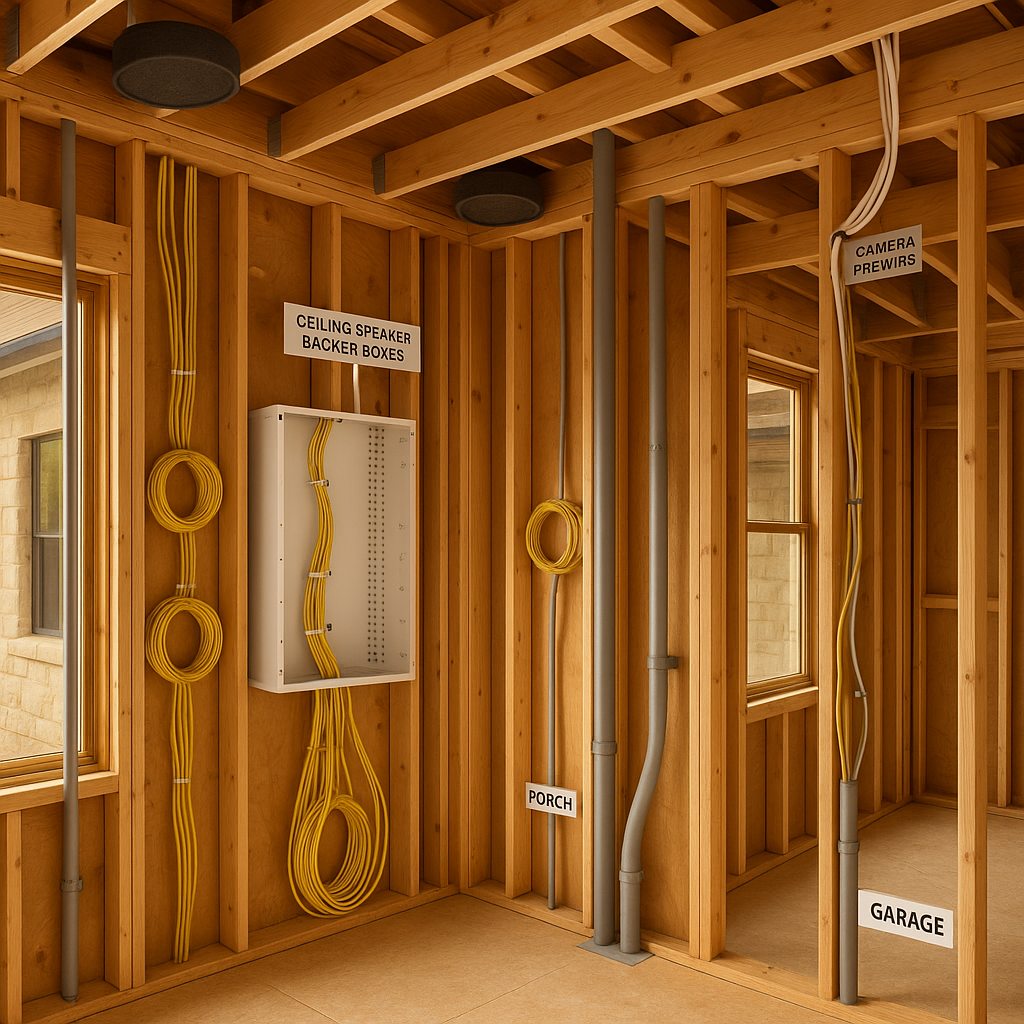
The cheapest time to get technology right is before drywall. A thoughtful prewire plan makes your Hill Country custom home fast, secure, and easy to upgrade—without future drywall cuts. Start with the backbone: run Category 6 or better to every TV location, office, access point, and anywhere you might stream high‑bitrate video. Pull coax to TV points for cable/satellite fallbacks. Home run all low‑voltage cabling to a ventilated structured media panel located centrally and away from electrical noise. Plan conduit stubs (1–2 inch) from the panel to the attic and crawl/garage for future pulls. Audio and entertainment are easier when infrastructure exists. Prewire in‑ceiling or in‑wall speakers in living spaces, patios, and game rooms, and pull subwoofer lines to logical corners. For theater or media rooms, map speaker and projector locations early; industry guidance on immersive audio performance from CEDIA’s RP‑22 helps teams speak a common language: CEDIA/CTA RP‑22 Immersive Audio Recommended Practice. Security should be hard‑wired where practical. Prewire door and window contacts, glassbreaks, wired keypads, cameras at eaves, and gate/drive cameras back to the panel; supplement with PoE for network cameras. Plan power and data for a video doorbell at a comfortable height. For smart shades, pull low‑voltage power and control lines to windows you’ll automate. Think power, too: specify dedicated circuits for network gear, AV racks, and in‑ceiling access points to avoid nuisance resets. Outdoors, prewire for dark‑sky friendly lighting zones, gate controls, and landscape speakers—then control them so fixtures stay warm and fully shielded. A standards‑based approach today protects your options tomorrow.
Standards, panels, labeling, and Wi‑Fi that just works
A little discipline in standards and layout keeps systems reliable. Use a structured cabling standard as your north star; the latest residential telecom standard, ANSI/TIA‑570‑E, defines how residential cabling supports voice, data, video, security, and control across a home: ANSI/TIA‑570‑E overview. Centralize terminations in a ventilated panel or small rack with room for a modem, router/firewall, PoE switch, patch panels, and an uninterruptible power supply (UPS). Label both ends of every run and keep a living map of cable IDs and destinations. Design Wi‑Fi like a utility. Hard‑wiring fixed devices frees spectrum for phones and tablets, while strategically placed ceiling‑mounted access points (APs) deliver even coverage. Run Cat6 to ceiling locations in halls and great rooms; avoid placing APs inside closets or metal enclosures. If you’ll have detached buildings, trench a direct‑bury or conduit‑protected fiber or Cat6A to each outbuilding—hard‑links beat long‑distance Wi‑Fi bridges for reliability. Coordinate low‑voltage with trades. Keep parallel separation from electrical runs where possible, cross at 90 degrees when needed, and protect penetrations with fire‑caulk. For entertainment systems, reference CEDIA’s standards and best‑practice hub for additional design guidance and training resources: CEDIA standards and best practices. Leave pull‑strings in conduit, cap outdoor boxes, and photograph every wall before insulation—future‑you will thank you.
Texas‑smart tips for porches, outbuildings, and resilience
Hill Country living adds a few twists. Porches and outdoor rooms deserve real infrastructure: prewire for fans, dark‑sky compliant warm downlights, and PoE for cameras or access points at the eaves. At gates and long drive courts, run low‑voltage plus spare conduit for keypads, intercoms, and future motorized openers. If your plan includes a detached garage, workshop, or casita, stub fiber or Cat6A plus spare conduit along the same utility corridor you’ll use for power—dig once, serve multiple needs. Think resilience. Add a small UPS for your modem, router, and ONT so internet and cameras stay up during short outages. If you’re planning backup power, coordinate transfer switch location and the circuits feeding the network closet so your critical connectivity survives grid hiccups. Outdoor cameras and access control should be powered via PoE from an indoor switch to simplify surge protection and maintenance. Finally, document and test. Create a simple one‑page legend of drops, label plates, and verify every run with a cable tester before drywall. Keep a binder (or cloud folder) with network diagrams, IP plans, and device credentials. With a standards‑based prewire and clean documentation, your custom home will adapt to new tech for decades—without holes in your walls.